
I started working on WP Full Picture over 6 years ago. For all this time I saw a lot of misinformation and false beliefs circulating over the internet concerning privacy regulations and requirements. Some of them benefit CMPs (Consent Management Platforms).
Let’s find out what they are.
P.S. This is not legal advice.
1) When a “Google-certified CMP” matters (and when it doesn’t)
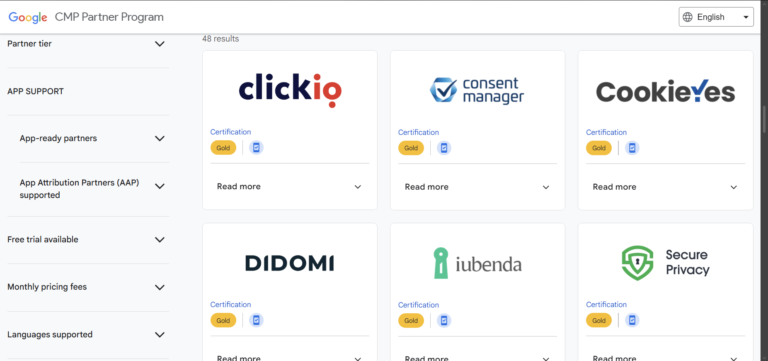
The first false belief is that a CMP needs to be certified by Google. This is true only if you display ads on your site. This is because a CMP cannot be certified by Google if it is not compatible with AdSense (ad network).
However, if you don’t show ads on your website, Google certification is not your concern. You only need to use a platform that supports Google’s Consent Mode v2 – like WP Full Picture.
2) “Certified CMP” vs “the plan you bought” (a common trap)
To continue with the previous topic, let’s assume that your site shows ads to its visitors and you decide to use a Google Certified CMP. Does it mean that you are using a solution that is compatible with Google’s ad network?
Not always.
In order for the CMP to get the “Google Certified Partner” badge, it needs to use TCF IAB framework (for managing consents for ad networks). However, usually only paid plans include it.
Let me give you an example.
In the description of a free version of a popular WordPress plugin My Agile Privacy, we read this:

However, the TCF IAB certificate (required to get the “Certified” label) is only available in the highest paid plan.
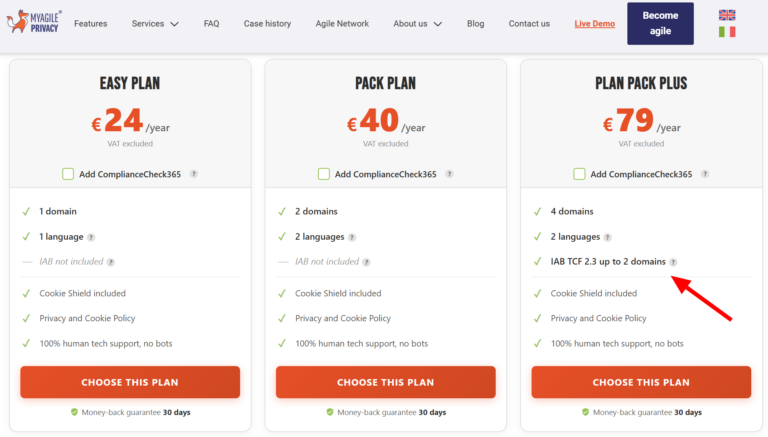
And here’s another example from CookieYes.
Their homepage says this…

Which may suggest that all their consent solutions are compatible with Google’s tools. However, their pricing says this…

This means, that Google AdSense is only supported from the $25/month plan upwards.
If you don’t look at this specific entry in their pricing, you may believe that all plans are certified to work with google ad networks.
3) Yes – you should keep proof of consent
If you rely on consent as your legal basis, GDPR expects you to be able to show that consent happened.
Where processing is based on consent, the controller shall be able to demonstrate that the data subject has consented to processing of his or her personal data.
GDPR Article 7.1
However, some CMPs seem to “forget” to mention it on their websites, do not share all the details, or plainly say something opposite.
Here’s another example from the My Agile Privacy plugin I mentioned earlier.

I followed their blog posts and found information that this claim is based on FAQ on an (unspecified) Italian website. After a quick search I found one this is likely to be the one they mention. In one of the points we read:

So, does this mean that a mere cookie on the visitor’s browser is enough?
It may seem so, but, in my view, this is just “being lazy” on part of the person writing this text.
If interpreted as “a cookie alone is enough proof”, that would conflict with GDPR’s requirement to be able to demonstrate consent.
This text should be understoon as “you may use a technical cookie to store/remember the user’s banner preference (e.g., so you don’t show the banner again for a period)”. Legal duty is ability to demonstrate consent, which you cannot do with just a cookie on user’s device.
And since we are talking about proofs of consent…
4) What should “proof of consent” include (in practice)
The proof of consent is not just a record of a click + date. It’s an audit trail. This means it needs to show clear evidence to answer questions like:
- Did the user give consent?
- When?
- What did they agree to?
- What information did they see?
To answer these questions, a strong consent record should include:
- Time and date of the choice (plus timezone!)
- What choices were made (accept all, reject all, or per category)
- Were they tracked before the consent or only after (opt-in or opt-out)
- Consent categories/purposes (e.g., “stats”, “marketing”)
- Vendor set / vendor list identifier (important for sites that show ads to visitors)
- A copy of the texts from the consent banner and the privacy policy (or a hash and ID of the text, if it is stored separately)
- Country where the choice was made (because privacy regulations differ by region)
- A consent ID (usually also saved in a cookie – this is the cookie I talked about in the previous section)
- And, optionally, for added security, records of tracking configuration – to show that your tools respected consent preferences.
Is it a lot? Yes it is. But only this information lets you reliably answer questions above.
Sadly, many CMPs collect only minimal consent information and many don’t do it at all.
Please, have a look at an example of a proof of consent that is saved by WP Full Picture (saved in ConsentsDB.com).
5) No – you do not need cookie lists
Sometimes people ask me whether WP Full Picture can list cookies in the privacy policy.
The answer is simple – no, because it is not legally required, plus, it is technically almost impossible.
In fact, not that long time ago I wrote a separate article with all the details on this topic. Just check what is says. It also sheds some light on why cookie lists even exist and why CMPs like them so much.
However, this does not mean that you should not put any information about cookies in your privacy policy. Quite the contrary.
You are legally bound to inform your visitors what tools on your site track your visitors, by what means (cookies too), what types of cookies they use, for what purpose, what they do with the collected data, etc. You just don’t have to list tens or hundreds of cookies that your site uses.
6) Cookie scanning is necessary unreliable
CMPs scan websites of their clients for cookies. This helps them learn what tracking tools they use and which ones they need to block.
But this is the theory. In practice:
- There are millions of individual cookies and only a small percentage of them is listed in databases of cookie scanners.
- Scanning for cookies can find only the ones that are set on webpage load. Others, that are set later or after user actions are never found.
- Some tools don’t use cookies for tracking (but they use different methods).
- And lastly, tools that claim they don’t need consent… may require it! (more on that in the next section).
The result? Cookie scanners give many false alarms, miss many cookies and cannot block all that needs to be blocked. You can use them as a starting point, but take scan results with a pinch of sault.
7) Tools that don’t need consent… may still need it!
Some analytics tools market themselves as “we don’t use cookies, so we don’t need consent.”
Sometimes it’s true, but not always. Consent may still be required if:
- you use these tools to track personal data
- or they use different methods of tracking instead of cookies (like local or session storage).
Only the latter can be detected by automatic tools. No automatic system will make an audit of your tracking tool’s configuration and tell you that you risk fines.
Simple rule: it’s not only about cookies. It’s about unauthorized collection, processing, and sharing of personal data.
8) No automatic solution will make your site compliant
The most important thing that CMPs don’t want you to know is this – compliance cannot be achieved using fully automated solutions.
This is a short point, but sums up all what I said above. Let me know in the comments what you think about it.
