
WP Full Picture 10 is currently being released to PRO users. Like with every release, we are releasing it in batches, to 25% of users every few days.
WP Full Picture 10 is a major release with many important changes.
Fully asynchronous file loading
The main goal of this release was to fix the problems that WP Full Picture had with caching plugins. Before version 10, WP FP loaded its files in specific order, which caused issues with caching plugins which were configured to change this order.
Now, all files in WP FP are loaded asynchronously, and the order in which they are loaded will no longer cause any issues.
This will not only fix caching issues, but also improve scores in page-loading speed tests.
At the moment we are testing its compatibility with caching tools and only found problems with one option in Autoptimize and WP Rocket.
Dashboard page
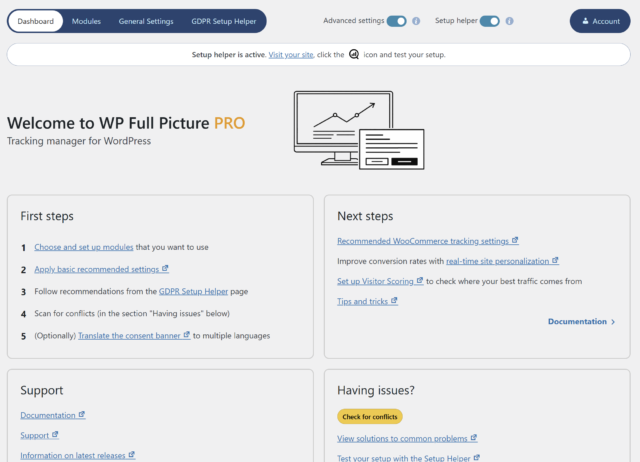
So far, WP Full Picture had many options, but no single place to find guides, easy-to-follow onboarding, and useful info. This will all change starting with version 10, which will come with a new dashboard (home screen) with guides, tutorials, tips and automatic detection of incompatible plugins and themes. In later versions I will be also adding onboarding and links to tutorial videos.
Simplified navigation
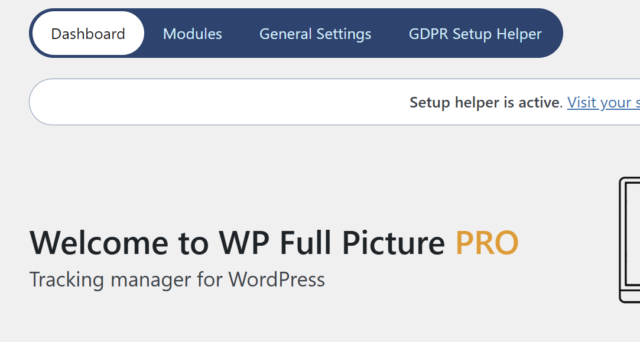
So far, WP Full Picture had all links to its settings and information pages in the side menu. This added confusion and unnecessary complexity.
Starting from version 10, links to the main plugin settings and the GDPR setup helper will now reside in the top menu, together with the “Modules” and “Dashboard” links.
Reactions module (Pro only)
The Reactions module lets you increase your site’s conversions using behavioral targetting.
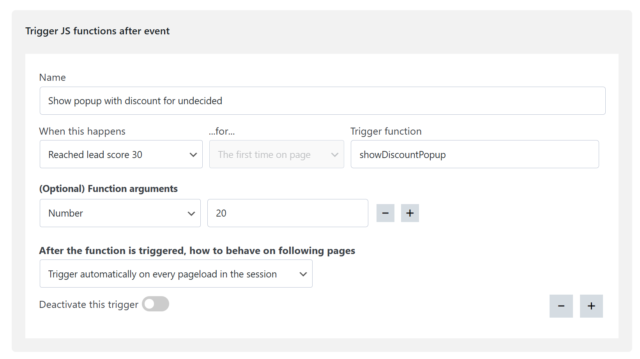
With this module, you can use custom triggers to fire JavaScript functions and change CSS classes of HTML elements.
For example….
- You create a custom trigger, that fires when someone’s visitor score reaches 30 points (indicating that someone is very interested in your products)
- You use this trigger, to fire a JavaScript function that opens a popup with a 20% discount code
Your setup would then look like this
Improvements to blocking 3rd party tools
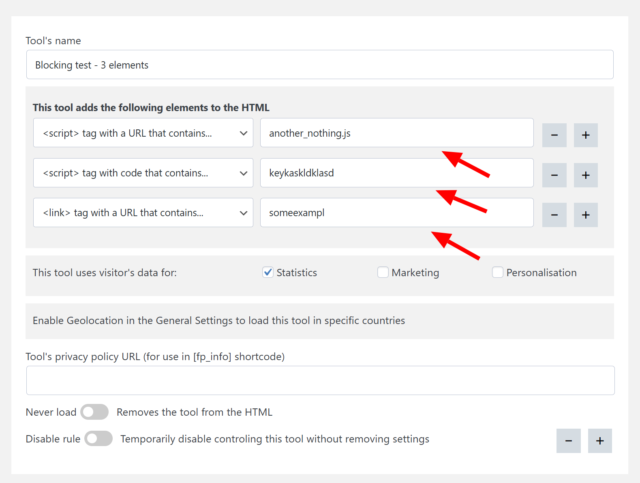
We fixed issues with blocking 3rd party scripts (in the Consent Management module) and allowed for grouping them.
WooCommerce tracking improvements
- Code modification to allow asynchronously loaded files in WP FP track Woo
- Option to send “add to cart” events on cart page rather then when users click “add to cart” buttons
- Option to disable sending “add to cart” events completely – this is useful when you want to send “add to cart” event yourself.
- Track product views as product list views – This is useful when you have a page that displays multiple products (not product teasers) but you don’t want to track them as single product.
Other changes
- Visual improvements – the design is now not as strong as before, but should be more practical
- Removed animation from the consent banner – it was unnecessary, and some speed testing tools counted the time that it took for the banner to show, to the page loading time.
- Small changes to tracking functions in the WooCommerce tracking module
- Optimized the JS functions of the consent banner
- Removed an option to disregard cookie choices due to abuse and improper use
- Removed an option to force load Google Analytics and Ads scripts – the option didn’t do anything since the file was always loaded according to advanced consent mode
- Removed an option to load Google Analytics and Ads in specific countries due to the fact that it is always loaded as according to advanced consent mode
- Pixel Manager for WooCommerce support – consent banner can now selectively enable/disable tools loaded by the Pixel manager depending on visitor’s choices
- PixelYourSite support – all tools loaded by PYS are blocked until consent
- Added time data to fpdata object – useful for building custom triggers
- Custom triggers can now use “Mouse left window” action
Fixes
- Fixed a small JS bug on the settings page of the Google Analytics module
- Fixed a bug which prevented session cookie to be updated when a user updated from WP FP Free to Pro
- Fix a bug in Status Based Order Tracking in GA4, which stopped tracking orders if the user used different GTAGs for Google Analytics and Ads
- Fixed JS errors on “blur” events
- Removed debug_mode parameter from GA events
- Consent banner’s scroll lock is no longer removed by WooCommerce
- Improved CSS style of iframe placeholders, so that will no longer get incorrect dimensions on some setups