With Engagement Tracking, you can:
- see which traffic sources bring you visitors who are the most interested in your products and content
- see how many visitors are likely to make a purchase
- send ads to visitors on different stages of a conversion path
You can learn everything about it from this short video
What to give points for?
We recommend giving the events values from 1 to 9, where 9 is adding a product to cart or starting checkout. You can also set negative values if some events show that a person is not interested in purchase. See this example:
| Action | Points | Why |
|---|---|---|
| Visited homepage | +1 | First touch, minimal intent |
| Viewed any category page | +2 | Browsing, early exploration |
| Viewed a product page | +3 | Looking for a product that meets their needs |
| Showed interest in a product (scrolled 66%, viewed gallery, stayed 20+ sec.) | +6 | Considering a purchase of a specific product |
| Used product search | +3 | Actively looking for something |
| Viewed 3+ product pages in one session | +4 | Strong browsing intent |
| Added product to cart | +9 | High purchase intent |
| Started checkout | +9 | Very high intent |
| Signed up for newsletter | +4 | Willing to stay in touch |
| Visited “About Us” or “Reviews” page | +3 | Building trust |
| Visited “Return policy” page | -9 | Not a buyer |
| Visited “Careers” or “Investor Relations” | -5 | Not a buyer |
How does it look in analytics tools?
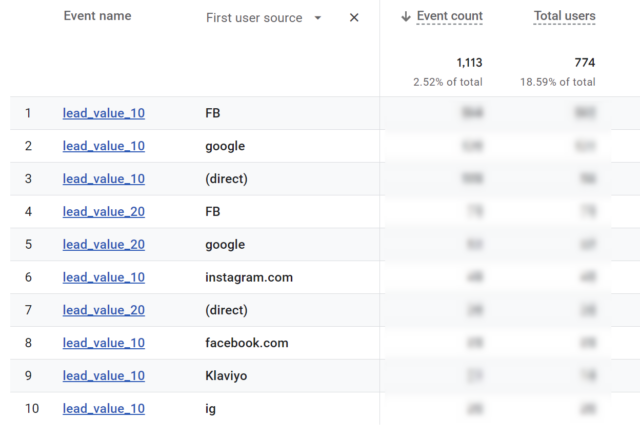
Depending on your analytics tool and your event setup, you may see slightly different data. In the example below we see Google Analytics report showing how many “lead_valueX” events were triggered by which traffic sources (1st page of results).