
WP Full Picture has so many features, that it is easy to miss the ones that are very useful. In this article I will tell you about some of the most interesting and useful ones, that you probably don’t know about.
Verify website ownership with meta tags
Meta tags are small pieces of code that some tracking tools may ask you to place on your site to verify its ownership.
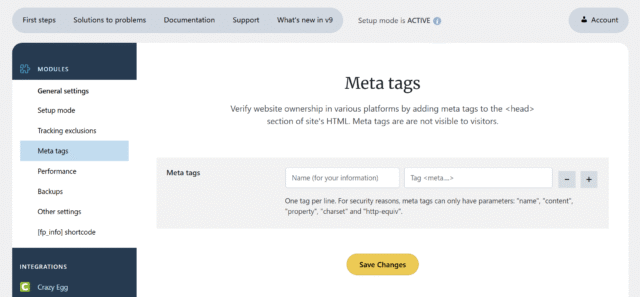
The good news is, that you don’t need a separate plugin to do it. You can place meta tags right from General Settings > Meta tags.
Use backups to move settings between sites

WP Full Picture has a built-in option to save your settings in General Settings > Backups. It is very handy to use it to move settings from one website to another.
Use Google Analytics to track script errors
We added tracking JavaScript errors to Google Analytics. It is very useful to make sure your website always runs perfect.
Use page labels to analyse groups of pages
In WordPress, pages have no specific use. They can be used as landing pages, product pages, contact pages and many more. WP Full Picture lets you label them to analyse them is groups. Learn how to do it.
Find the locations of broken links
WP Full Picture lets you find broken links on your site and other sites (which link to yours). Follow this tutorial to set it up and learn how it works.
Use fpdata object in your own code
WP Full Picture sets a JavaScript object called fpdata. It contains information which the plugin uses to enable tracking tools, track things and build custom triggers. However, you can also use it to power your own scripts. Check them out. The fpdata object has a ton of data.

You can learn more about fpdata here.
Track “big fish” purchasers with custom triggers
When a WooCommerce purchase confirmation page is displayed, WP Full Picture adds to the fpdata object this data:
- completed_orders_number – how many orders a person made
- completed_orders_value – value of all orders completed by the client
- completed_orders_average_value – the average value of an order
You can use it to build custom triggers and track how many orders come from big purchasers.
Have I missed something?
If you feel there is something missing, please write it in the comments and I will add it to the post.